
Chat Edit by EzPicture
The AI Image Editing App you can talk to
Upload a photo, tell Chat Edit what to change, and keep the conversation going until it looks right. Swap backgrounds, remove objects, restyle scenes and fix details step by step — every edit is saved as a version you can return to.
- Edit by conversation
- Unlimited version history
- Top AI editing models
- No design skills needed
New here? Sign up free and get credits to try your first edits.
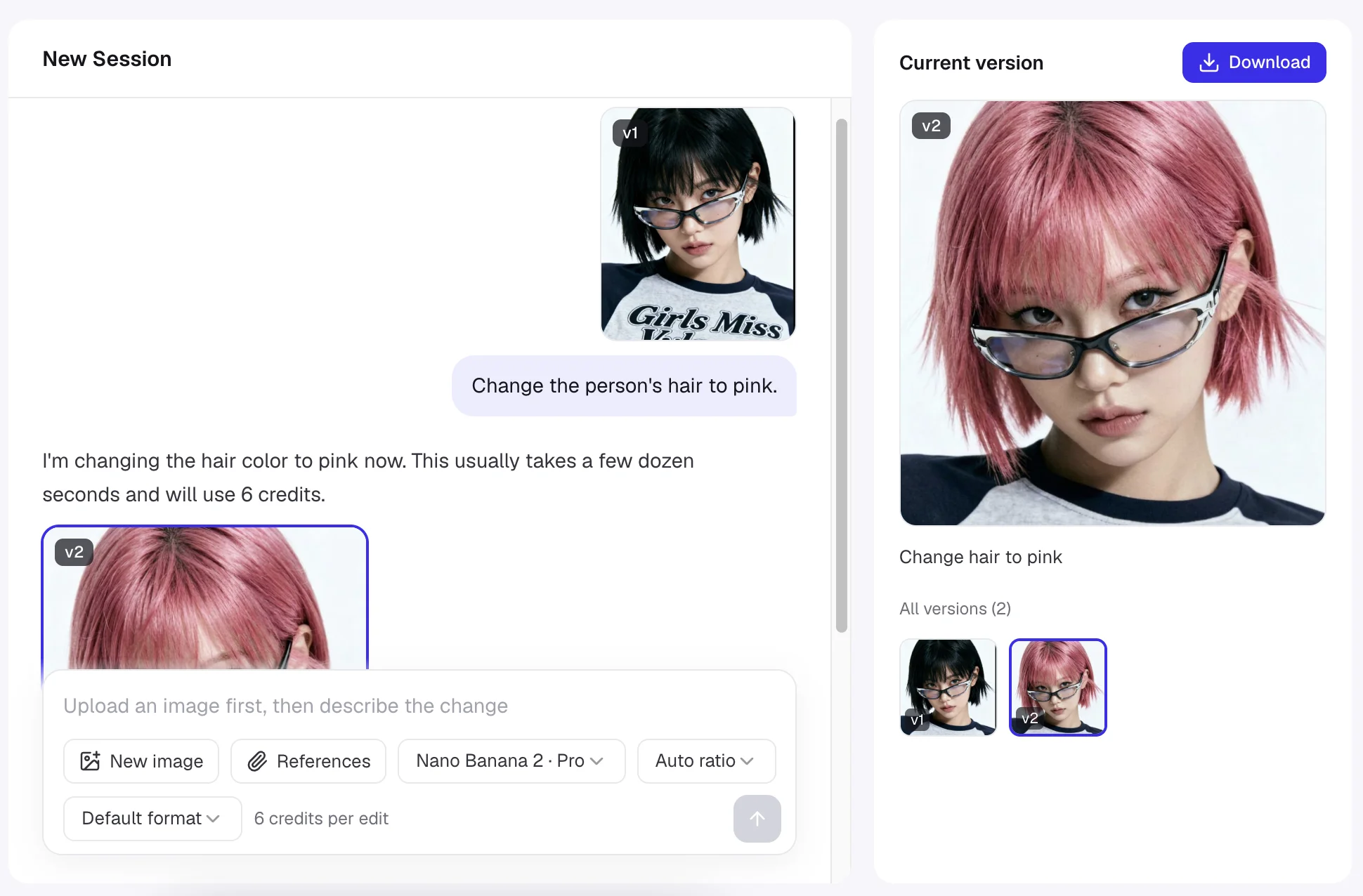
What is Chat Edit?
Chat Edit is an online AI image editing app that lets you edit pictures by chatting. You upload an image, describe the change you want in everyday language — such as "replace the background with a beach at sunset" — and an AI assistant translates your request into a precise instruction for a state-of-the-art image editing model, then returns the edited image in seconds.
Unlike one-shot photo editors, Chat Edit remembers the whole conversation. Each result becomes a numbered version, so you can build an edit in small steps, compare earlier versions, reference any of them with @, and jump back the moment a change goes in the wrong direction. It runs in the browser, works on desktop and mobile, and requires no layers, brushes, masks or Photoshop knowledge.
- 1 chat
- Upload, describe, refine — all in one conversation
- ~10–60s
- Typical time for each edit to finish
- ∞
- Versions kept per session, ready to roll back
- Free
- Credits for new accounts to try Chat Edit
Watch an image evolve, one message at a time
Good edits rarely happen in a single prompt. With Chat Edit you make one change, look at the result, and ask for the next — the way you would brief a professional retoucher.

v1 — Upload the original
Start with any photo: a product shot, a portrait, a travel picture or a rough concept. The upload becomes version 1 of your session.
"Here is my product photo."

v2 — Clean up the scene
Ask for the first change. Chat Edit removes clutter, swaps the background and matches the lighting so the subject still looks natural.
"Remove all the text from the image and keep only the sandwich."
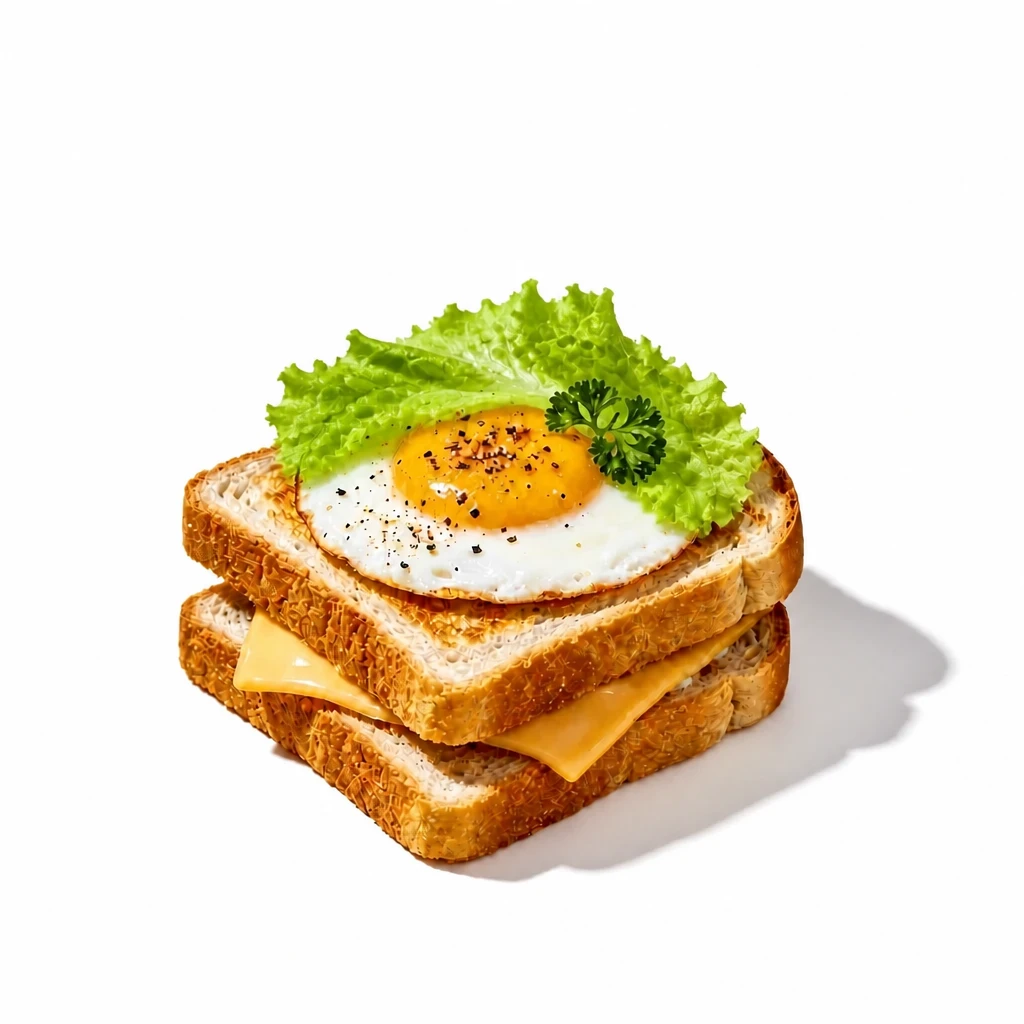
v3 — Refine the details
Keep going in the same chat. Adjust colors, add props or change the mood while everything you already approved stays intact.
"Add a fresh lettuce leaf on top of the egg, and set the background to #FFFFFF."
Why Chat Edit is a different kind of image editing app
Chat Edit combines a conversational assistant, leading image models and a version system in one workspace, so editing feels like talking rather than operating software.
Edit images by chatting
Describe what you want the way you would say it to a person. The assistant understands intent like "make it look less busy" or "more premium" and turns it into a precise editing instruction.
Every edit is a version
Each successful edit is saved as v1, v2, v3 and so on. Open the version history, preview any step and click "Continue from this" to branch off from an earlier result.
@ mentions for precise references
Type @ to reference an uploaded asset or an earlier version — for example, "use the sky from @v2 on the current image" — so the AI knows exactly which picture you mean.
Reference images and media
Attach reference images to guide style, product details, faces or composition. Models that support it can also accept reference video or audio, with clear per-model limits shown in the composer.
Choose the best editing model
Switch between leading image editing models such as GPT Image 2, Nano Banana Pro and Seedream from the same chat box, and see the credit cost of each edit before you send.
Control aspect ratio and format
Pick an output aspect ratio for social posts, banners or product listings, or keep it on Auto. Where the model supports it, choose the output file format as well.
Sessions you can come back to
Every project lives in its own session with full chat history. Rename sessions, pick up where you left off tomorrow, or start a fresh session for a new image.
Speaks your language
Write instructions in English, Chinese or another language. Chat Edit replies in the language of your interface and stays focused on image editing tasks.
Results saved to your assets
Download any version in full quality. Generated images are also stored in your asset library, so they stay available even after you delete a conversation.
How to edit a photo with the Chat Edit app in 4 steps
From upload to finished image in a few messages — no tutorials required.
Upload your image
Open Chat Edit and upload a JPG, PNG or WebP photo. It appears on the canvas as version 1 of a new session.
Describe the change
Type what you want in plain language. Add reference images or @ mention an earlier version when you need extra precision.
Review the new version
In about 10 to 60 seconds the edited image appears as the next version, with a one-line summary of what was changed.
Refine, roll back and download
Keep chatting to adjust details, return to any earlier version if you prefer it, and download the final image when you are happy.
Replace the background with a beach at sunset and keep the person's face unchanged.
Done — the background is now a sunset beach and the lighting on the subject has been warmed to match. Saved as v2.

 BeforeAfter
Chat Edit vs. traditional image editing apps
Classic photo editors give you tools; Chat Edit gives you an assistant. Here is how the two approaches compare for everyday editing work.
| What matters | Chat Edit (AI, conversational) | Traditional image editing app |
|---|---|---|
| Learning curve | None — describe the result in words | Hours of tutorials for layers, masks and brushes |
| How you make changes | Natural-language instructions in a chat | Manual selection, painting and adjustment sliders |
| Complex edits (background swap, object removal, restyling) | One message each, finished in seconds | Many manual steps, often 15–60 minutes |
| Undo and history | Named versions you can preview, reference and branch from | Linear undo stack, lost when the file is closed |
| Using reference images | Attach or @ mention them directly in the message | Manual compositing and color matching |
| Where it runs | Any modern browser on desktop or mobile | Usually a desktop install and a capable computer |
Traditional editors remain the right choice for pixel-perfect manual retouching. Chat Edit is built for the far more common case: you know what you want the image to look like and simply want it done.
Who uses the Chat Edit image editing app
From solo sellers to marketing teams, anyone who needs good images fast and doesn't want to learn complex software.
E-commerce sellers
Turn quick phone shots into clean listing photos: remove backgrounds, add lifestyle scenes and create variants for every marketplace.
Social media creators
Restyle photos, resize for each platform and test several looks for thumbnails and posts — all in one chat thread.
Marketers and small teams
Adapt one campaign visual into many versions for ads, banners and A/B tests without waiting for a designer.
Everyday photo editing
Remove photobombers, fix lighting, change outfits or turn a family photo into a painting — just by asking.
Edit instructions that work well in Chat Edit
You can say almost anything, but clear, specific requests give the best results. Try these to get started.
Tips for better results
- Make one main change per message, then build on it in the next one.
- Say what must stay the same, such as "keep the face and pose unchanged".
- Describe materials, lighting and mood — "soft morning light" beats "better light".
- Use @ to point at a reference or an earlier version instead of describing it from memory.
Image editing app FAQ
Answers to common questions about editing photos with Chat Edit.
For beginners, the best image editing app is one where you describe the result instead of learning tools. Chat Edit by EzPicture is built exactly for that: you upload a photo, type the change in plain language, and the AI edits it in seconds. You can keep refining in the same conversation and roll back to any previous version, so there is no risk of ruining your image.
Chat Edit pairs a conversational AI assistant with leading image editing models. The assistant reads your message, the conversation history and any references you attached, writes a precise editing instruction, and sends it to the image model you selected. The result is saved as a new version in your session, together with a short summary of what changed.
You can start for free. New accounts receive free credits after sign-up that can be used for Chat Edit. Each edit costs a number of credits that depends on the selected model, and the exact cost is shown in the composer before you send. You can buy more credits or upgrade to a plan whenever you need them.
Common edits include replacing or removing backgrounds, removing objects and people, changing outfits, adjusting lighting and color, restyling a photo as a painting or illustration, adding text, extending or reframing an image to a new aspect ratio, restoring old photos and creating product shots. If you can describe it, you can ask for it.
Yes. Every successful edit is stored as a numbered version (v1, v2, v3…). Open the version history to preview any of them and click "Continue from this" to keep editing from that point. Earlier versions are never overwritten, so you can always return to them.
Yes. Attach reference images with the References button or type @ to mention an uploaded asset or an earlier version. References help with style matching, product consistency, face consistency and combining elements from several pictures. The composer shows how many references the selected model accepts.
Chat Edit lets you choose among the image editing models enabled on EzPicture, such as GPT Image 2, Nano Banana Pro and Seedream. Different models have different strengths — for example, photorealism, text rendering or style changes — and you can switch models between messages in the same session.
Modern editing models are good at keeping untouched areas intact, and Chat Edit's assistant adds explicit instructions to preserve the subject. For the best results, say what must stay the same, such as "keep the face and pose unchanged". If a result drifts, roll back to the previous version and rephrase.
Yes. Chat Edit is a web-based image editing app that runs in any modern browser on Windows, macOS, iPhone, iPad and Android. There is nothing to install, and your sessions sync to your account, so you can start on your phone and continue on your computer.
Images created on paid plans can be used for advertising, e-commerce, social media and client work. Make sure you own or have permission to edit the photos you upload, and that the final content respects applicable laws, the content policy and third-party rights.
Try the image editing app that listens
Upload a photo, say what you want, and let Chat Edit handle the rest. Your first edits are on us.